



Sevcon Gen4 Motor Controllers
Understanding the Built-In Applications of the BorgWarner Sevcon Gen4 Motor Controller
The Sevcon Gen4 motor controllers feature built-in applications (called node controls) for electric vehicles, boats, pumps, and power steering systems, all while ensuring CANOpen CiA 402 compliance for fast and seamless integration.
Understanding Node Controls in the Sevcon Gen4 Motor Controller
A node control is a virtual program or application that runs separately from the motor controller on the BorgWarner/Sevcon Gen4. It exists on the motor controller in place of an external device, such as a PLC or microcontroller, but operates as if it were an independent system.
There are four node control options:
- Motor drive left (Part of TracApp) – Designed for electric vehicles
- Motor drive right (Part of TracApp) – Used alongside Motor drive left in dual-motor electric vehicles
- Motor drive pump (or PumpApp) – Designed for operating pump systems
- Motor drive power steer – Designed for power steering systems
Alternatively, no application can be mapped. This option is selected if you intend to use an external device (such as a PLC or microcontroller) to develop a custom application.
The Role of Built-in Node Controls in the Sevcon Gen4 Motor Controller
The BorgWarner/Sevcon Gen4 is structured to comply with the CANOpen CiA 402 standard, which defines the functional behaviour of motor controllers. In CiA 402, a motor controller operates as a CAN slave and is controlled using only three CAN messages: ControlWord, Target Torque, and Maximum Velocity (assuming torque mode).
However, a real-world system typically requires additional functionalities, such as throttle, brake, and line contactor. These features require a CAN master application interpret user inputs and translate them into commands the CAN slave can process.
To address this, the Gen4 is designed with built-in node controls, allowing it to function as both a motor controller and a CAN master application, eliminating the need for an external device.
How the Sevcon Gen4 Motor Controller Interprets Inputs: Node Control vs External System
The following two examples demonstrate two different implementations of the same function:
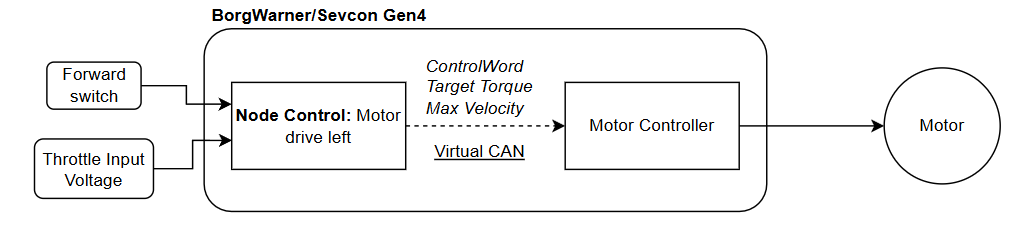
- Using the built-in node control
- The node control interprets inputs directly within the Gen4, processing the throttle and forward switch commands that are mapped to its physical inputs.
- TracApp translates the commands into ControlWord, Target Torque, and Maximum Velocity and sends them via virtual CAN to the motor controller, which then drives the motor accordingly.
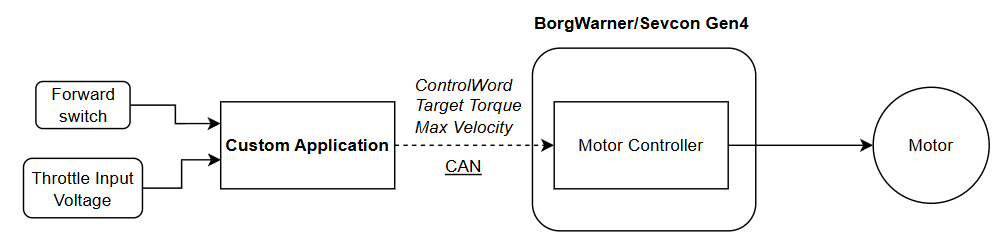
- Using an external PLC or microcontroller
- An external PLC or microcontroller runs a custom application that interprets user inputs throttle and forward switch.
- The processed commands are transmitted to the CAN slave (the motor controller) via a physical CAN, which then drives the motor accordingly.
Mapping Digital & Analog Inputs in the Sevcon Gen4: Node Control Considerations
When mapping digital and analog inputs, it’s important to recognise that these are node control features, not inherent motor controller functions. For example:
- Forward Switch applies to TracApp, meaning it is relevant to Motor drive left/right.
- Pump 1 Switch applies only to PumpApp, making it specific to pump system operations.
Understanding these distinctions ensures correct input mapping based on the application in use.
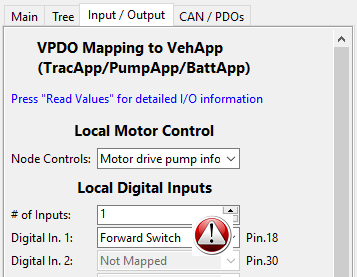
The following example shows incorrect node control mapping, where Forward Switch, a TracApp function, is mistakenly used with PumpApp, where it has no relevance.
How DVT Software Distinguishes Motor Controller and Node Control Parameters
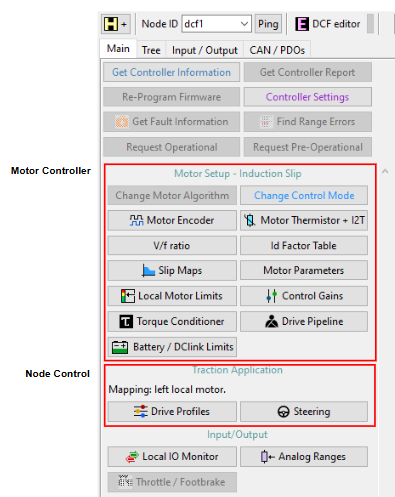
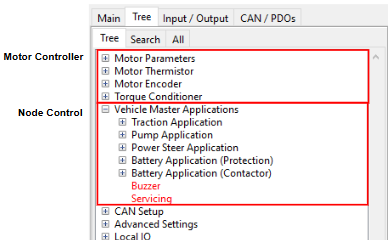
The DVT software distinguishes between motor controller settings and node control settings, ensuring clear parameter categorisation. The following images illustrate how each setting is grouped within these categories.
Managing Battery Applications in the Sevcon Gen4 Without Node Control
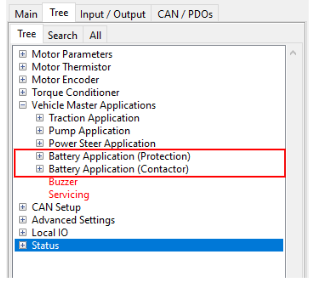
Battery Application (Protection) and Battery Application (Contactor) are standalone sub-applications that do not require a node control to be mapped. As long as the Gen4 is set as a CANOpen Master (0x5800,0), these sub-applications will function independently.
This allows the Gen4 to transition into Operational mode and manage the line contactor while still maintaining its role as an effective CANOpen Slave